Case Study · 2024 — 2025 · Growth · Web · AI EdTech

From a one-function search tool to 30K math learners.

Founding Product Designer at Lucens AI. Redesigned MathSolver from the ground up and shipped 4 new features — grew to 30K registered users in ~1 year.

mathsolver.top

1000
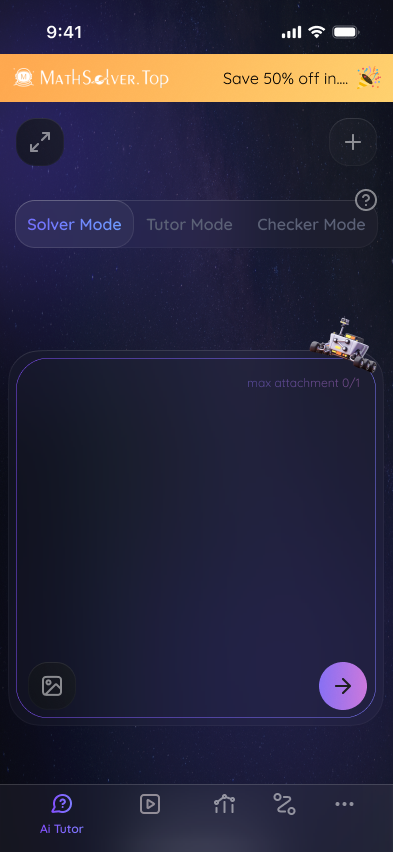
Solver Mode
Tutor Mode
Checker Mode

max image attachment 0/1

|Input your question in text here

Solve this question step by step
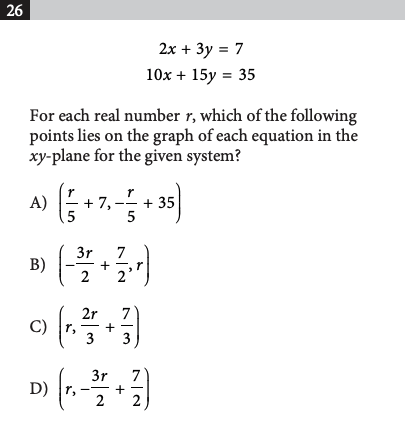
Example
Role
Founding Product Designer
Growth-focused
Timeline
Aug 2024 — Aug 2025
~12 months
Team
10 – 15 people
Founders, eng, growth
Platform
Web app (primary)
Responsive tablet & mobile web
Contributions
Growth · Research · Product strategy
UX · UI · Design system
The bet
Utility → ecosystem.
A one-function search tool tops out at one use case. Bet: turn it into a learning ecosystem where one problem leads to a whole test, a gap analysis, and a daily plan — so visitors come back for the full prep arc, not just an answer. Retention compounds where utility doesn't.
The product
MathSolver.
AI Tutor — Solver · Tutor · Checker on one problem. Bulk Solving — full test PDFs. Knowledge Graph + Daily Study Plan — weak spots and the schedule around them. mathsolver.top ↗
Who it's for
Test-prep learners.
Middle-school students through adult learners preparing for math-heavy exams — SAT, ACT, GRE, GMAT, college placement. People with a test on the calendar, not casual browsers.
01 · Walking into ambiguity

Transforming a Utility into a
Product Ecosystem.

When I joined, MathSolver was a one-function search tool — and nothing else. No system, no research, no funnel. Three structural gaps to close before any feature could compound.

01 · Starting state

One flow, one answer.

A single search box dropped a solution. No context, no follow-up, no way to learn. Users searched once and left.

02 · Zero signal

No funnel, no telemetry.

No analytics on activation or retention, no learner interviews on file, no segmentation of who was actually showing up.

03 · No language

No system to reuse.

Every screen was a one-off. Colors, spacing, and components drifted across the app. Shipping a new feature meant redesigning the rails.

02 · How I operated

Founding designer, growth-wired
shipping weekly, learning weekly.

01
Research — Discord cohort

Tested every function pre-ship

MathSolver had a Discord of math learners recruited from online communities before launch. I ran multi-round tests with them on every new function before locking the flow — fast, in-context feedback each cycle.

02
Strategy — cross-functional

Replace the PM role

With no PM in place, I worked directly with the founder, the engineering team, and the marketing team — owning roadmap calls across all three. Prioritization ran on activation-and-retention impact, not feature count. Scope decisions made in 30-minute stand-ups, not docs.

03
Design & eng — tight loop

Ship in 1–2 week cycles

Designed in Figma, handed off side-by-side with engineers, QA'd in prod. Anything bigger than two weeks, I broke down.

04
Growth — with the marketer

Designed the funnel, not just the UI

Partnered with the growth marketer on onboarding, upgrade prompts, referral, and landing pages. Instrumented every surface before it shipped.

03 · The redesign

From a search box to a product
the redesign at a glance.

BeforeInherited — 2024
MathSolver
+ Upload picture
Copy picture
| copy your question in text here…
Helper Mode
Learner Mode
AfterRedesign — 2025
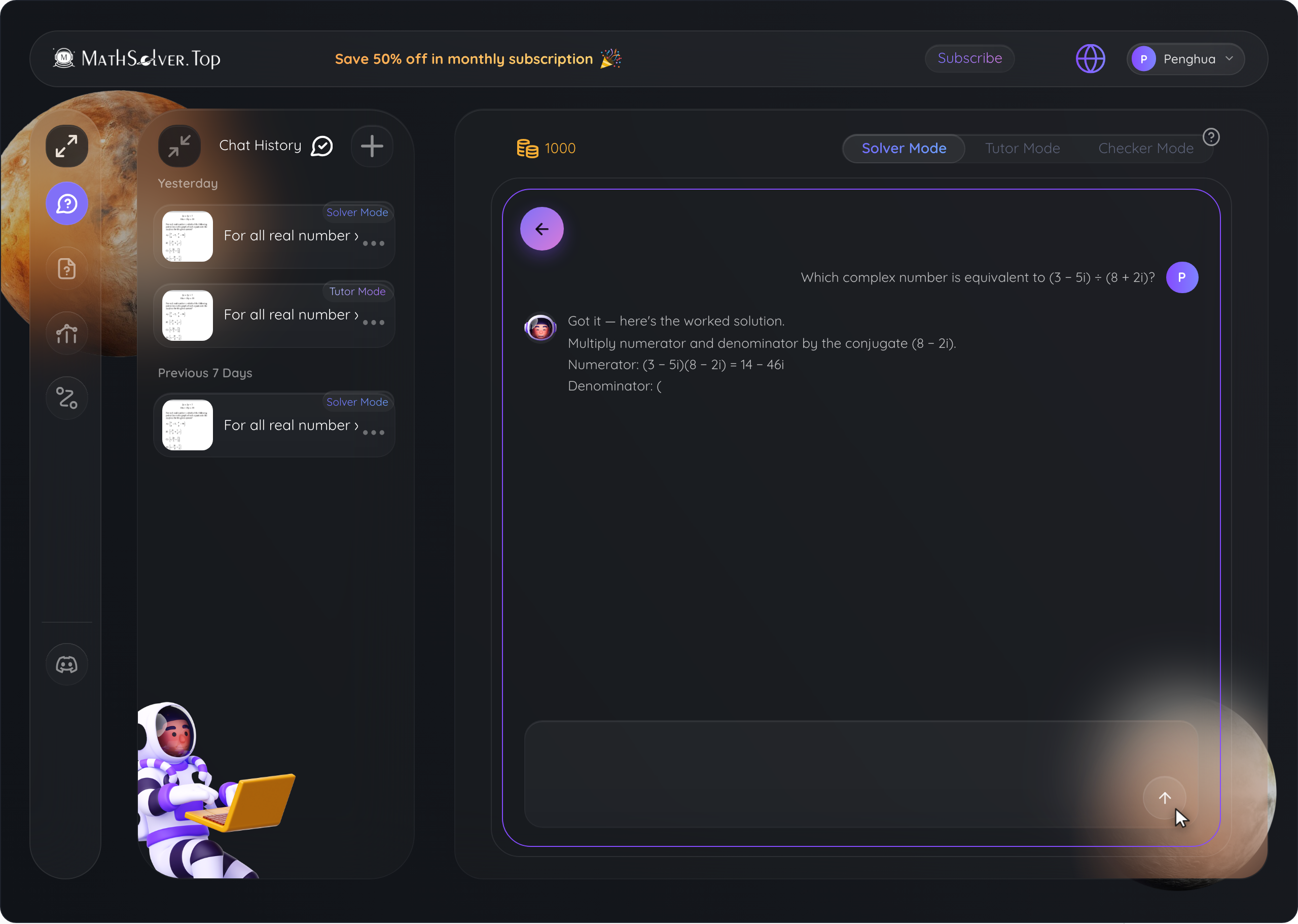
AI Tutor — Solver Mode response with question history rail
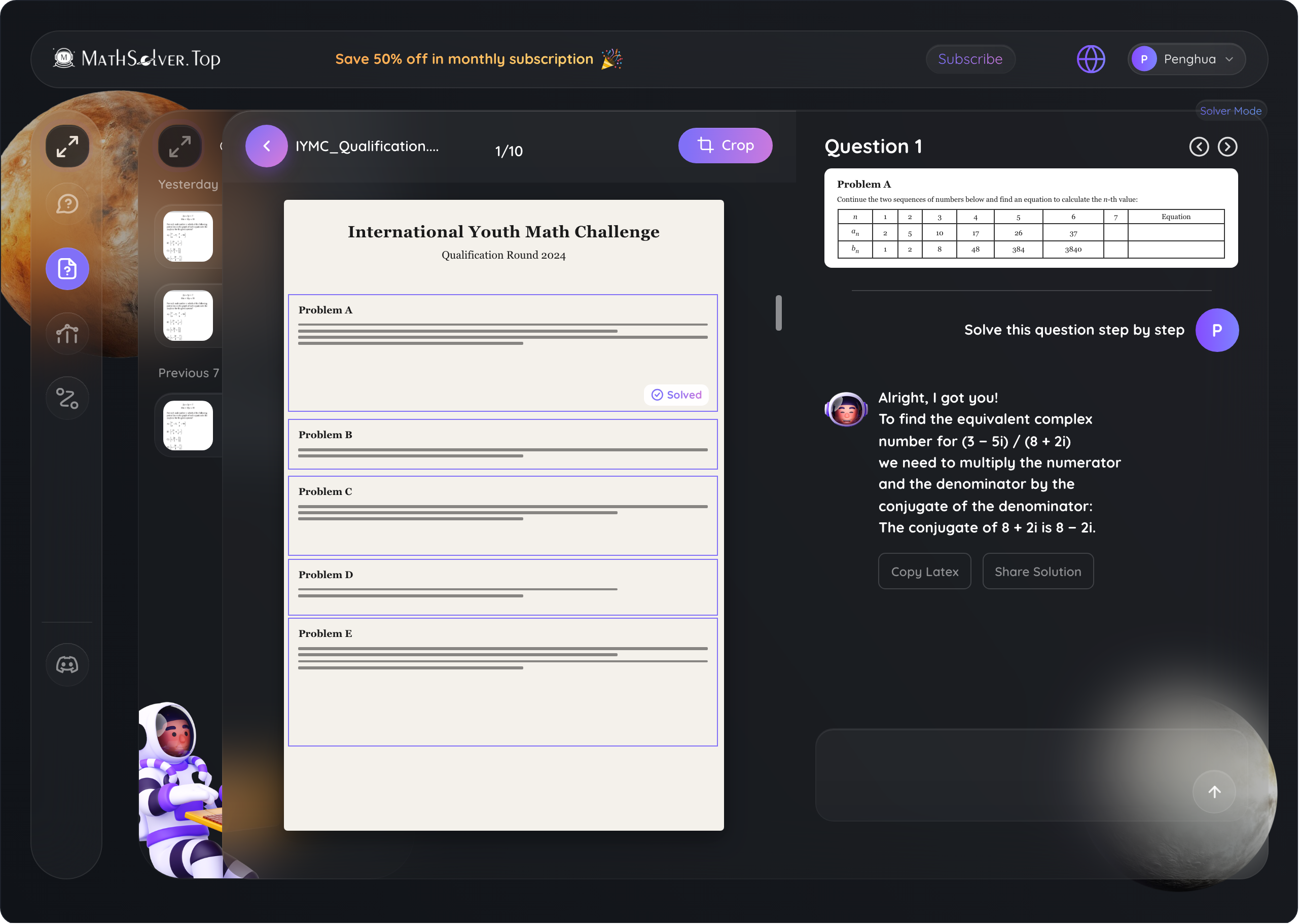
Bulk Solving — PDF parsed and problems listed in the workspace
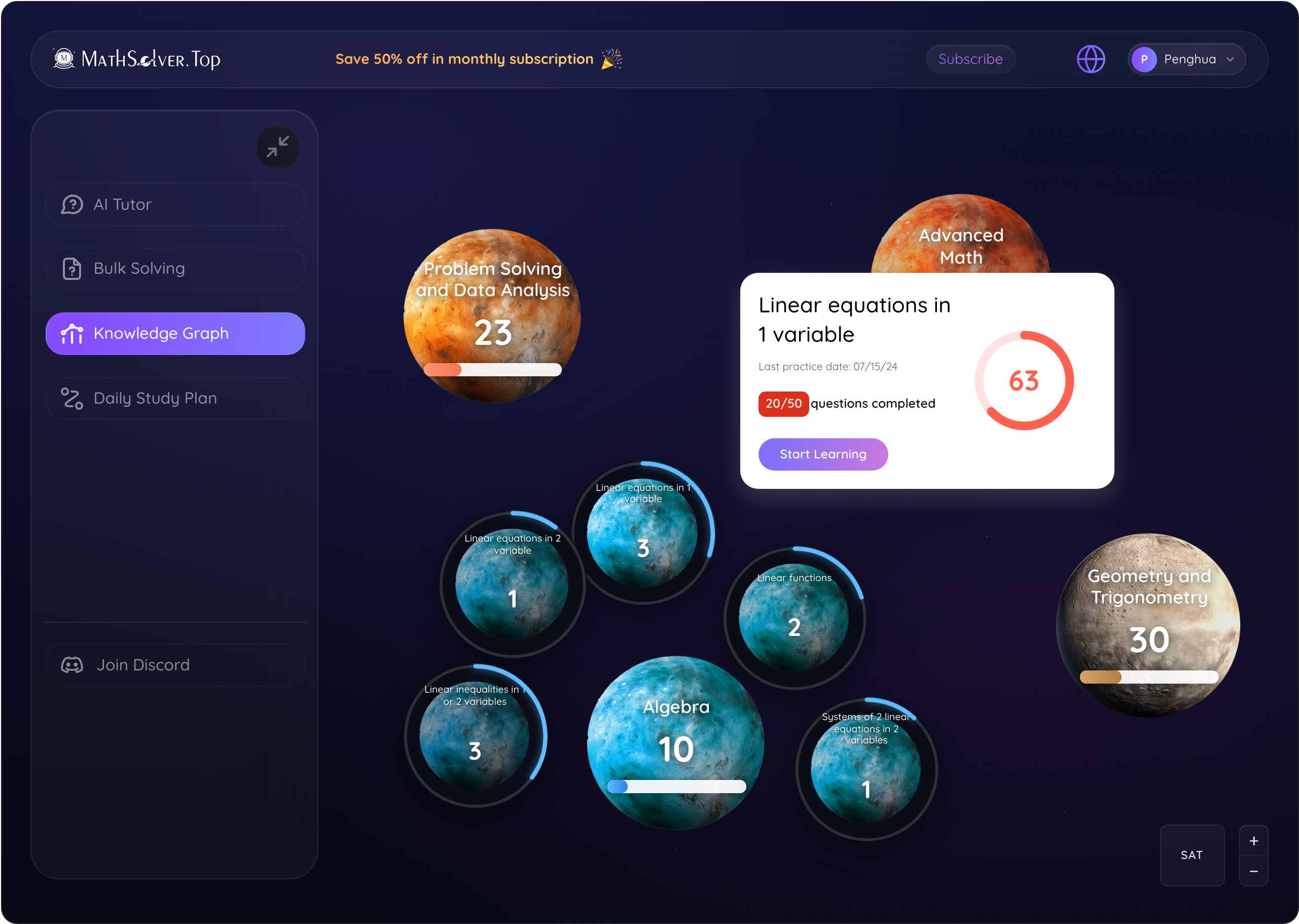
Knowledge Graph — clicked Algebra planet, sub-planets fanned out
The three biggest shifts
  • IA · from one tool to a study ecosystemGrew a single math search into four products. AI Tutor and Bulk Solving cover the short-search jobs — fast answers on one problem or a whole test. Knowledge Graph and Daily Study Plan build the daily routines that turn single-use visitors into returning learners — where retention compounds.
  • Retention surfaces · from one-shot tool to compounding loopsWired three retention mechanics into the product itself: a persistent history rail that re-anchors return sessions, a credits economy always visible next to the profile, and referral as a first-class nav item — not a modal surprise. Single-use moments became return visits.
  • Visual language · from clutter to a metaphor-driven systemUser interviews surfaced one persistent ask: organize knowledge into levels — main concepts with sub-concepts beneath. We landed on a planetary metaphor — planets orbit larger planets the way sub-concepts orbit a parent topic. The whole visual system grew out of that: dark canvas, purple-gradient atmospheres, Quicksand for voice, glass surfaces for rails. One vocabulary across every screen, anchored by the metaphor.
04 · Research process

What drove every decision
the research behind the redesign.

Before launch, MathSolver had built a Discord community spanning our three core user segments — middle schoolers, high schoolers, and adults preparing for entry exams (med-school MCAT, grad-school GRE/GMAT, and other math-heavy programs). We recruited members from online math forums and study groups. That cohort became the research backbone of the redesign. As each new version of the design landed, we tested it with the Discord cohort across three layers of feedback: qualitative interviews to surface intent, user surveys for quantitative data, and LogRocket heatmaps that played back every cursor and scroll path. The breakdown below shows the relative weight of each method in the final decisions.

45%
User Interviews
5+ sessions · SAT-prep cohort

I need a structured breakdown of my knowledge in the SAT test.

— High-schooler, SAT-prep
35%
Survey

Pre-redesign survey across the Discord cohort — questions on audience, goals, study habits, and feature priorities. Findings below decided what we shipped.

  • ~80% in middle + high school, ~20% adults preparing for entry exams (MCAT / GRE / GMAT).

    → Two-cohort positioning, surfaces tuned to each.

  • Goals differed by cohort — middle wanted single-problem solves; high wanted a structured study plan; adults wanted full-test rehearsal.

    → Four parallel surfaces: AI Tutor · Knowledge Graph · Daily Study Plan · Bulk Solving.

  • Most respondents returned without a study routine.

    → Daily Study Plan became the retention loop.

  • Top requests: step-by-step explanations, weak-area diagnosis, full-test PDFs.

    → Mapped 1:1 to the shipped feature set.

20%
LogRocket Heatmaps

Users tested the inherited web app while LogRocket recorded their full sessions — cursor paths, hover dwells, and click-aways. Reviewing the replays showed exactly where attention stalled on the old design.

LogRocket · top friction on the inherited UI
MathSolver
+ Upload picture
Copy picture
| copy your question in text here…
Helper Mode
Learner Mode
  • 1Copy picture — purpose unclear. Users paused or skipped after misreading the action.
  • 2Helper / Learner Mode — labels conflated. Users couldn't tell the modes apart.
Define audience and product positioning strategy

~80% of users came from two cohorts — and the product split followed.

~80%Core · middle + high schoolers ~20%Secondary · adults on entry exams
Core cohort

Middle schoolers

Individual problem search — they came with one math question, got an answer, and left. Solver speed mattered more than structure.

→ AI Tutor, fast turnaround
Core cohort

High schoolers

Structured study plan — wanted their SAT/ACT knowledge mapped systematically, not just one answer at a time.

→ Knowledge Graph + Daily Study Plan
Secondary cohort

Adults · entry exams

Test-prep on a deadline — MCAT, GRE, GMAT, and other math-heavy programs. Wanted full-test reps, not isolated solves.

→ Bulk Solving + full-test PDFs

Research → redesign decisions.

Every choice in the redesign — the new system and the four main features — traces back to a finding above.

  1. 00

    Foundation · New design system

    Research kept returning to one ask: let learners break knowledge into navigable points. We answered with a planet-and-orbit metaphor — each main planet is a knowledge point, and the smaller planets orbiting it are the breakdown of that point. Enter a planet and its sub-points orbit you as a fresh system. The metaphor outgrew a single feature — it became the visual language for the entire space-themed design system.

  2. 01

    Feature · AI Tutor

    Middle schoolers (the largest cohort) came for fast, single-problem solves. The Solver became the entry surface for that intent.

  3. 02

    Feature · Bulk Solving

    Adults preparing for MCAT / GRE / GMAT needed full-test rehearsal, not isolated solves. Bulk Solving processes whole-test PDFs and returns worked solutions end-to-end.

  4. 03

    Feature · Knowledge Graph

    High schoolers said it directly in interviews: "I need a structured breakdown of my knowledge." Every concept became a node, every topic a planet — a navigable map of what they know and what's next.

  5. 04

    Feature · Daily Study Plan

    Survey showed most respondents returned without a routine. The Daily Plan turned single-visit traffic into a return habit — the retention loop.

05 · DESIGN SYSTEM

Building the system while
shipping the product.

Design system

We built a system for MathSolver.

01
Brand
A pocket voyage through every math test — warm enough for a middle-schooler, sharp enough for a GRE re-take.
MathSolver Brand Guidelines 2025
Be precise. Math learning for everyone.
MathSolver V.01
MathSolver
Brand
01
02
Color — Primary
The load-bearing gradient. 60% of every hero, CTA, and icon accent.
Primary · 60% #854CFF → #7E83FF
MathSolver
Primary
02
03
Color — Supporting
The remaining 40% — accents and illustration states.
Secondary20%
Tertiary 110%
Tertiary 25%
Tertiary 35%
MathSolver
Supporting
03
04
Background — Surfaces
Three dark surfaces anchor the product canvas: page, glass blur, and modal popup.
Linear1A1C21 → 101318
BlurFFFFFF · 4%
Popup#12151B
MathSolver
Surfaces
04
05
Typography — Quicksand
Quicksand carries the voice across the product — from the 72px hero to the 12px caption.

MathSolver

MathSolver
Typography
05
06 · Interaction sketch

One rail, two states — collapse for canvas, expand for navigation.

A lo-fi sketch of the core interaction. Click the chevron to collapse the rail and reclaim canvas; click any of the four functions to switch surface. The collapsed state is the default — by the time learners reached MathSolver, AI chat products had already trained the muscle memory of a slim-rail layout. We carried that habit into the redesign and freed the canvas for the math itself.

AI Tutor
Bulk Solving
Knowledge Graph
Daily Study Plan
Surface AI Tutor
07 · The four features

Four bets shipped in a year —
each tied to a funnel metric.

Plus 8+ supporting sub-features that connected the funnel end-to-end.

Hero feature

AI Tutor · Solver, Tutor & Checker — one question → three learning paths.

Learners don't arrive with the same goal. Some need the answer before class; some need to understand it before the test; some want to check work they've already done. We split the output into three modes without splitting the input.

The user problem

Three distinct jobs surfaced from the same learner on different days:

  • "I need the answer now."
  • "I want to learn how to solve it."
  • "I solved it — did I get it right?"

"If I just need to check my answer, the walkthrough wastes my time."

The design decision

We made the mode a front-door choice — three pill buttons above the input — so the AI is primed before any output renders. Each mode answers one of the three jobs:

  • Solver Mode — provides direct answers and step-by-step solutions.
  • Tutor Mode — offers knowledge points and quiz questions that guide learners to solve problems independently.
  • Checker Mode — reviews uploaded solutions, identifies errors, and suggests corrections.

Try it → tap any state below to see the prototype shift. Sidebar collapsed keeps the icon rail tight to the chat. Sidebar expanded reveals the four feature labels. Chat history bar expanded slides past conversations out from beside the rail. Built from the live Figma exports — every transition runs locally, no canned video.

1000
Solver Mode
Provides direct answers and step-by-step solutions.
Tutor Mode
Offers knowledge points and quiz questions to guide you to solve problems independently.
Checker Mode
Reviews your uploaded solution, identifies errors, and suggests corrections.

max image attachment 0/1

|Input your question in text here

Solve this question step by step

Example
Feature 02

Bulk Solving — one PDF → every worked solution.

Test-prep learners rehearse with whole practice tests, not isolated problems. Bulk Solving accepts a full PDF and returns step-by-step solutions for every question on the paper.

The user problem

Adults preparing for MCAT, GRE, GMAT, and similar entry exams needed full-test rehearsal — 40+ problems per practice paper. Solving them one-by-one in a single-problem tool was a non-starter; the friction ate the study time that should have gone into the practice.

"I just want to upload the whole test and get every solution."

The design decision

Made PDF upload a first-class input alongside text and image. The AI parses every question on the test, solves each one step-by-step, and returns solutions in the same order as the original — so learners can review alongside their own work without losing the structure of the practice paper.

Feature 03

Knowledge Graph — every concept a planet, every gap a node.

High schoolers didn't want one more answer — they wanted a map of what they knew and what was missing. The Graph turned the curriculum into a navigable orbit.

The user problem

SAT/ACT prep felt like a list of disconnected topics. Students could solve a problem and still not know where it sat in the bigger curriculum — or what to study next.

"I need a structured breakdown of my knowledge in the SAT test."

The design decision

Built the curriculum as a planetary system — each main planet is a topic, each sub-planet a concept beneath it. Click into a planet and its sub-points orbit you as a fresh canvas. Mastered nodes settle; weak spots stay bright — turning "what to practice" from a guess into a glance. The metaphor outgrew the feature and became the anchor for the entire design system.

KG also seeds the Daily Study Plan — every weak node becomes a candidate for tomorrow's practice — making it the diagnosis half of the retention loop we ran with growth.

Feature 04

Daily Study Plan — the routine that turns visitors into learners.

A search tool gets traffic; a daily plan gets retention. The Plan turned single-visit users into a return habit — the explicit retention loop for the product.

The user problem

The pre-redesign survey was unambiguous: most respondents returned without a routine. They came when they were stuck and forgot in between — so growth leaked out the back as fast as it came in the front.

The design decision

Tied the Plan to the Knowledge Graph — weak nodes above a threshold became the day's practice, ordered by impact. The day's tasks live on the home surface, not buried in settings; each completion advances a planet's mastery and feeds tomorrow's plan. The loop runs itself.

+8%
7-day retention*

* 7-day retention lift delivered in partnership with our growth marketer, who owned the instrumentation and experiment design for the KG → DSP retention loop.

08 · Outcomes

Design feeding growth
and growth feeding design.

30K
Registered users · ~12 months from relaunch
+8%
7-day retention
Delivered by the KG → DSP loop — Knowledge Graph surfaces weak nodes; Daily Study Plan turns them into tomorrow's practice. Instrumented and validated jointly with our growth marketer.
4
Pillar features
AI Tutor, Bulk Solving, Knowledge Graph, Daily Study Plan — each scoped to one cohort and one funnel stage, every decision traced back to a research finding.
8+
Supporting features
Persistent question-history rail, credits economy, referral as a first-class nav item, share solution, mode help, language switcher — the connective tissue that wired the four pillars into a single funnel.
1
Design system
Tokens, components, and docs built alongside the product — not after. Anchored by the planetary metaphor that came out of user research; adopted by every engineer in the codebase.
09 · Reflection

What I learned being
the first designer.

Lesson 01

Design the funnel, not the feature.

The biggest wins came from asking "what metric does this move?" before "what screens does this need?" Each of the four pillars was scoped against a cohort and a funnel stage before a frame was opened in Figma. Polish without that lens is wasted motion in a startup.

Lesson 02

Build the system in parallel, not after.

I was tempted to "ship now, clean up later." Every time I did, I paid double. Starting tokens and components on week two cost two days and saved two months — and gave engineering a shared vocabulary instead of one-off pixel pushes.

Lesson 03

Partner with the growth marketer early.

The +8% retention wasn't mine alone — it was the KG → DSP loop and the instrumentation sitting in the same room. The biggest multiplier I had as a growth-focused designer was treating the growth team as a co-author, not a downstream client. The most valuable design reviews I sat in weren't with PMs — they were with growth.

Lesson 04

Say no on behalf of the user.

At a 10–15 person startup with no PM, every founder idea landed on me. The value I added wasn't execution speed — it was being the person who could name the tradeoff in research terms ("this fails the 80/20 cohort") and kill the wrong feature without apology.

Lesson 05

Taste is a funnel too.

Users don't separate "good design" from "trustworthy tool." Replacing the inherited UI's clutter with a metaphor-driven visual language moved activation — not because it looked nicer, but because it looked like something that deserved a signup.

Lesson 06

A metaphor outgrows the feature.

The planetary system came out of one user-interview ask — "I need a structured breakdown of my knowledge." We built it for Knowledge Graph; it became the anchor for the entire design system, the brand, and how engineers talked about the product internally. The best visual ideas don't decorate; they unlock.

Thanks.

MathSolver taught me that a growth-focused designer isn't the one who ships the most screens — it's the one who ships the screens that move the curve. If you want to see the live product —

Visit mathsolver.top Back to top
Next → Languru